

Importing The Data
Fri, 12/19/2008 - 13:21 — admin
Zaitun Time Series provides a facility to import the data created by another software in a specified format. Zaitun Time Series provides a tool to import the data from CSV file (.csv) and Excel file (.xls).
Zaitun Time Series only accept numeric fields, both in the Excel format and the CSV format. Please do not include non numeric fields (e.g. “Nov 2007”) in your CSV and Excel file which will be imported to Zaitun Time Series, except the first line/row which will be the list of variable name of the data.
To import a CSV file into the current Zaitun Time Series project:
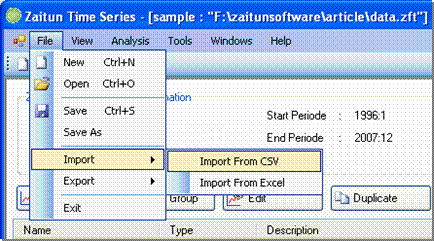
- Click File -> Import -> Import to CSV
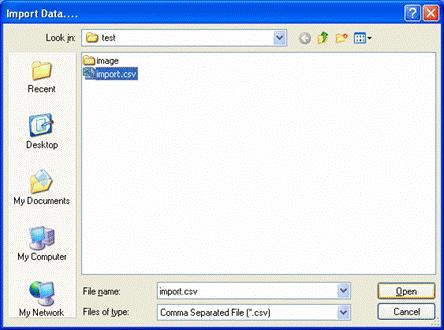
- The Open CSV dialog appear. Select the CSV file you want to import
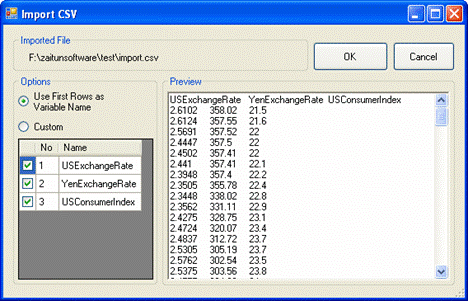
- The Import CSV dialog appear. The CSV file can’t contain non numeric fields except in the first line, which will be the variable name. Make sure the “Use First Row as Variable Name” option is checked if your CSV File contains variable name information. Then, select variables you want to import by making a mark on some check boxes in the variable grid.
Click the OK button to import the selected variable in the CSV file into the current Zaitun Time Series project
To import an Excel file into the current Zaitun Time Series project:
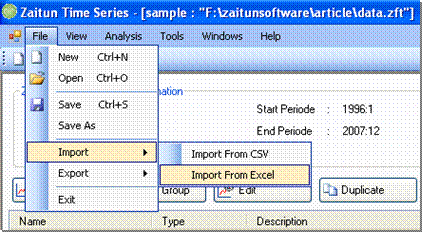
- Click File -> Import -> Import to Excel
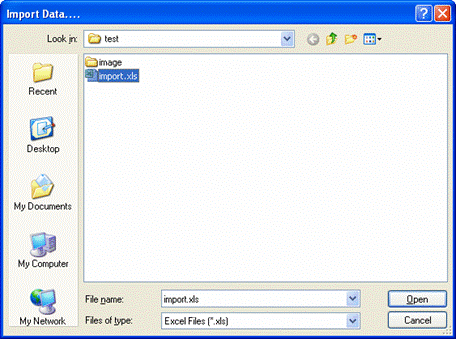
- The Open Excel dialog appear. Select the Excel file you want to import
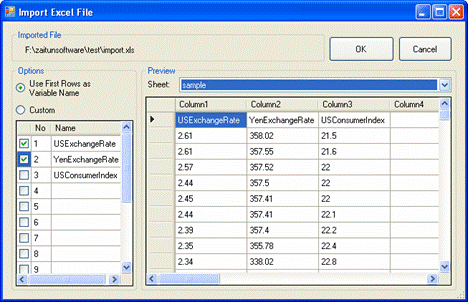
- The Import Excel File dialog appear. The Excel file can’t contains non numeric field field except the first row, which will be the variable name. Make sure the “Use First Row as Variable Name” option is checked if your Excel File contains variable name information. Then, select variables you want to import by making a mark on some check boxes in the variable grid. You can switch between sheets by selecting the sheet combo box in the Preview Pane.
Click OK button to import the selected variable in Excel file into the current Zaitun Time Series project.
- Login to post comments