

Exponential Smoothing Analysis with Zaitun Time Series
Thu, 11/20/2008 - 07:51 — admin
Zaitun Time performs exponential smoothing analysis of time series data, including single exponential smoothing, double exponential smoothing Brown, double exponential smoothing (Holts), and triple exponential smoothing (Winters). To perform exponential smoothing analysis on a time series variable:
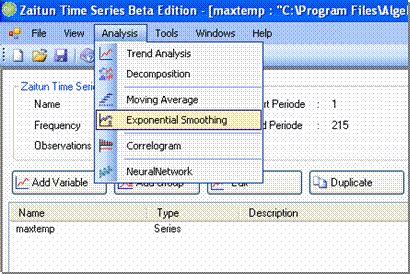
- Click Analysis -> Exponential Smoothing
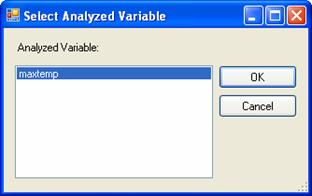
- Select Variable Dialog appears. Choose a variable you want to analyze with exponential smoothing analysis, and then click OK.
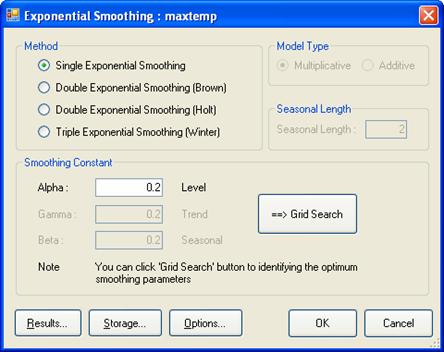
- The Exponential Smoothing form will appear. Choose the Exponential Smoothing method you want to apply to your variable, and determine the smoothing constant (alpha, beta, and gamma). For Triple Exponential Smoothing, determine its type, multiplicative or additive, and seasonal length.
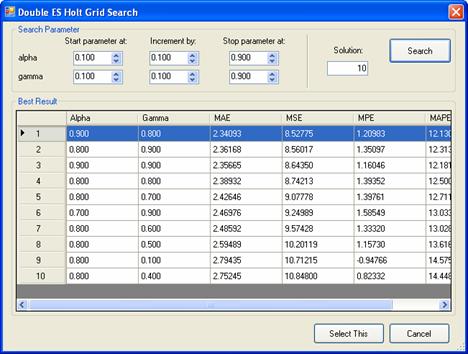
- Zaitun Time Series also provides Grid Search facility to facilitate user in searching smoothing constant values in yielding the least MSE value. You can search smoothing constant value by determining minimum and maximum boundary and increment interval. Application will search the combination of smoothing constant value in interval above which has the least MSE. N combination (default =10) will be shown. To choose the best value of smoothing constant click the value in list and click Select This button.
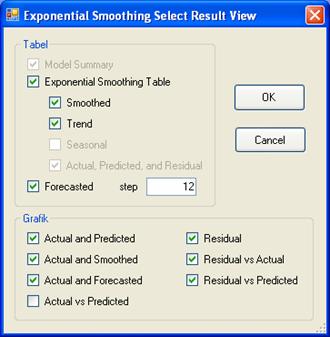
- To select analysis result that will be shown on Result View, click Results button. You can select some result views by clicking the checkbox of every selection. For Forecasted selection, you have to enter the data step you wish to forecast.
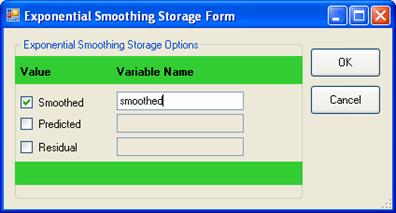
- To save the residual, predicted or smoothed data from the model as a new variable, click Storage button. Check the items you want to save as new variables, and then type the new variable names.
- After selecting the result views and determining whether you want to save the new variables or not, the software will show the Exponential Smoothing form again. Click the OK button to finish your analysis and to show the result views.
- The selected result views on previous step will be viewed as several tabs on Result View panel.
- Login to post comments