

Decomposition Analysis with Zaitun Time Series
Thu, 11/20/2008 - 20:55 — admin
Zaitun Time performs decomposition analysis on a time series data. To perform decomposition analysis on a time series variable:
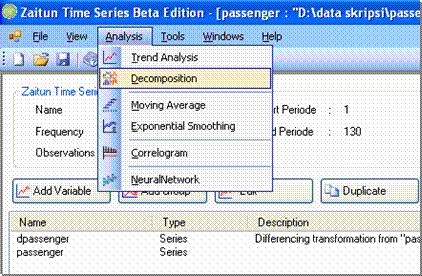
- Click Analysis -> Decomposition
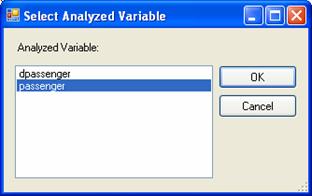
- Select Variable Dialog appears. Choose a variable you want to analyze with decomposition analysis, and then click OK.
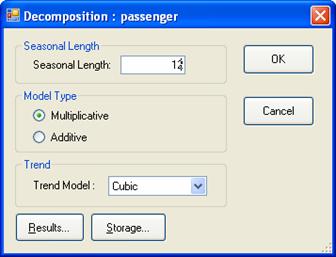
- The Decomposition form will appear. Determine the seasonal length, decomposition method (multiplicative or additive) and the used trend model. There are several trend models available, linier, quadratic, cubic, and exponential.
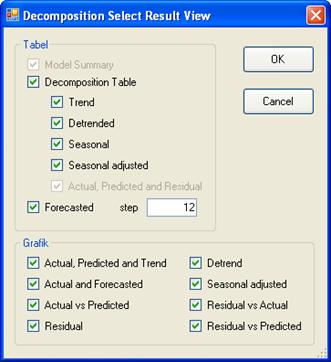
- To select the analysis result that will be shown on Result View, click Results button. Select the required result views by clicking the appropriate checkbox of every selection. For Forecasted selection, you have to enter the step of data you want to forecast.
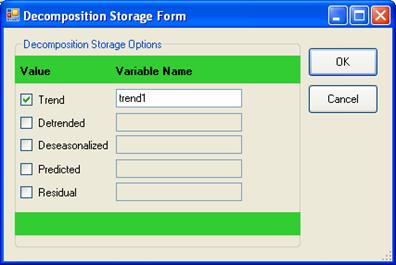
- To save trend, detrended, deseasonalized, residual, or predicted data from the model as new variables, click the Storage button. Check the item you want to save as a new variable, and then type the new variable name.
- After selecting result views and determining whether you want to save the new variables or not, the software will show the Decomposition form again. Click the OK button to finish the analysis and to show the result views.
- The selected result views from the previous step will be viewed as several tabs on the Result View panel.
- Login to post comments